
Ready to install?
Copy the link below and open it in your Chrome browser.
https://cakedino.com/install
Preview the app
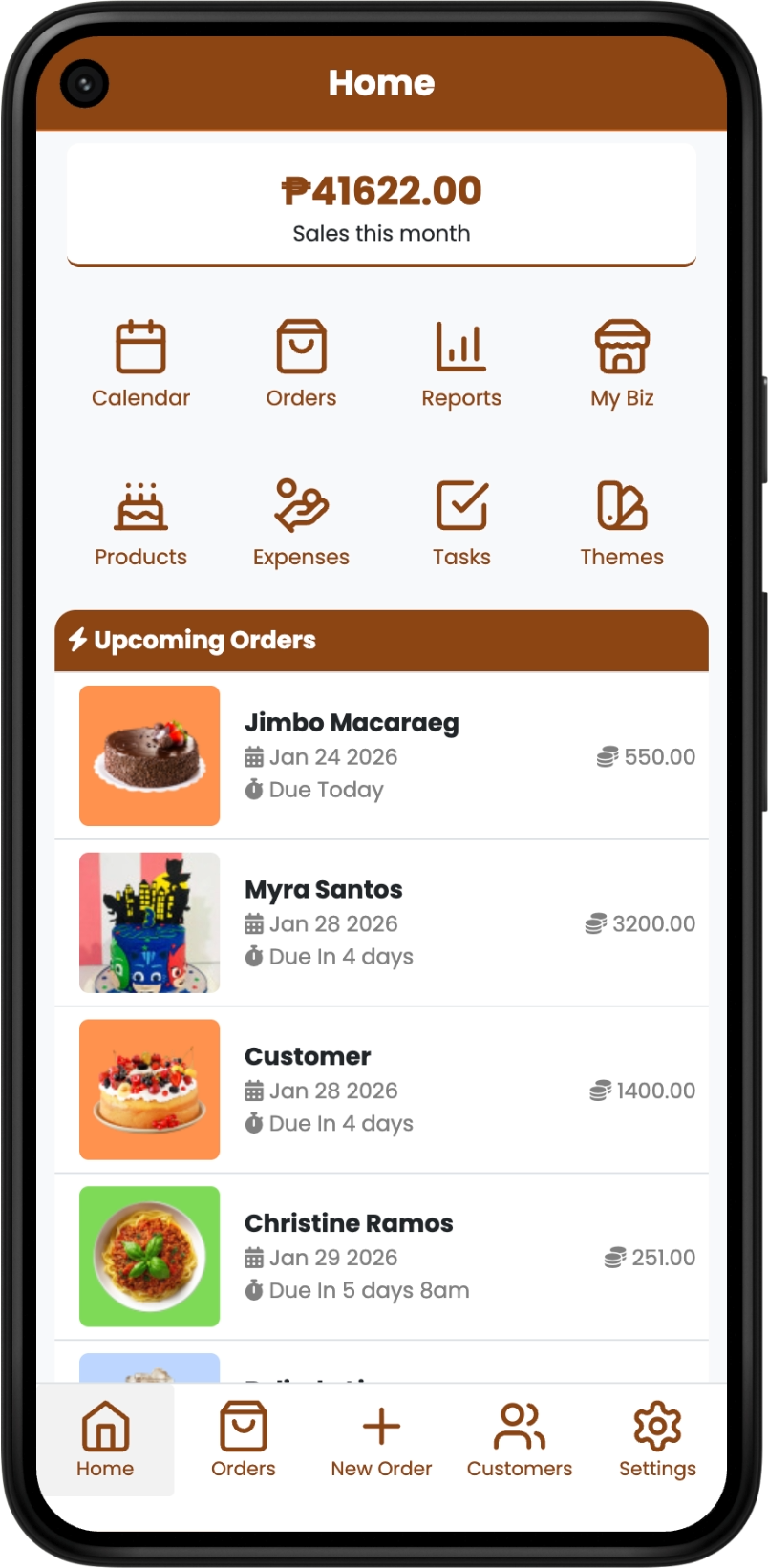
Install The App
Scan with your phone
Open CakeDino as an app on your phone for faster access to orders, calendar, and daily operations.
- Track upcoming orders, pickup times, and production status in one place.
- Manage your cake calendar, schedules, and deadlines without missing bookings.
- Use CakeDino POS for faster walk-in orders, payments, and daily selling.

Install CakeDino
Install prompt is not available. Check your device if in case CakeDino is already installed. Message us on Facebook if you need further assistance.
CakeDino installed successfully
Cakedino has been added to your home screen. The app Icon should appear.
Installing... please wait
We are preparing CakeDino on your device. This may take a few seconds.
Install the app
- 1 Tap icon near the address bar Or at the bottom on some devices
- 2 Tap Add to Home Screen Scroll down or click "More" if you can't find it.
- 3 Tap Add on the top-right. Then you can find CakeDino on your home screen!

'%3e%3cpath%20d='M16.984%2013.2512C16.983%2013.7444%2016.885%2014.2325%2016.696%2014.6878C16.506%2015.1431%2016.229%2015.5566%2015.88%2015.9047C15.532%2016.2528%2015.118%2016.5287%2014.662%2016.7166C14.207%2016.9046%2013.719%2017.0009%2013.226%2017L3.74401%2016.9834C2.74901%2016.9817%201.796%2016.5844%201.094%2015.8789C0.392002%2015.1734%20-0.00199242%2014.2175%207.57729e-06%2013.2216L0.016014%203.74879C0.017014%203.25563%200.115008%202.76747%200.304008%202.31218C0.494008%201.8569%200.771003%201.44339%201.12%201.09529C1.468%200.747176%201.88201%200.471286%202.33801%200.283356C2.79301%200.0954257%203.28101%20-0.000854289%203.77401%205.71079e-06L13.256%200.0165758C14.251%200.0183158%2015.204%200.415636%2015.906%201.12113C16.608%201.82661%2017.002%202.78247%2017%203.77844L16.984%2013.2512ZM15.759%203.95072C15.759%203.59929%2015.691%203.25117%2015.557%202.92625C15.423%202.60133%2015.227%202.30597%2014.979%202.05703C14.731%201.80809%2014.437%201.61045%2014.113%201.47539C13.789%201.34034%2013.442%201.27051%2013.091%201.26989L3.924%201.25387C3.573%201.25325%203.22501%201.32186%202.90101%201.45578C2.57601%201.5897%202.28101%201.78631%202.03201%202.03438C1.78401%202.28244%201.586%202.57712%201.452%202.90156C1.317%203.22601%201.24701%203.57389%201.24601%203.92532L1.23101%2012.9839C1.23001%2013.3353%201.29801%2013.6834%201.43201%2014.0083C1.56601%2014.3333%201.762%2014.6286%202.01%2014.8776C2.258%2015.1265%202.55201%2015.3241%202.87601%2015.4592C3.20001%2015.5943%203.54801%2015.6641%203.89901%2015.6647L13.065%2015.6807C13.416%2015.6813%2013.764%2015.6127%2014.089%2015.4788C14.413%2015.3449%2014.708%2015.1483%2014.957%2014.9002C15.205%2014.6522%2015.403%2014.3575%2015.538%2014.033C15.672%2013.7086%2015.742%2013.3607%2015.743%2013.0093L15.759%203.95072Z'%20fill='black'/%3e%3cpath%20d='M12.1893%208.01892H5.13272C4.77843%208.01892%204.49121%208.30613%204.49121%208.66043V8.66043C4.49121%209.01473%204.77843%209.30194%205.13272%209.30194H12.1893C12.5436%209.30194%2012.8308%209.01473%2012.8308%208.66043C12.8308%208.30613%2012.5436%208.01892%2012.1893%208.01892Z'%20fill='black'/%3e%3cpath%20d='M9.30176%2012.1887V5.13211C9.30176%204.77781%209.01454%204.4906%208.66025%204.4906H8.66025C8.30595%204.4906%208.01874%204.77781%208.01874%205.13211V12.1887C8.01874%2012.543%208.30595%2012.8302%208.66025%2012.8302C9.01454%2012.8302%209.30176%2012.543%209.30176%2012.1887Z'%20fill='black'/%3e%3c/g%3e%3cdefs%3e%3cclipPath%20id='clip0_538_4'%3e%3crect%20width='17'%20height='17'%20fill='white'/%3e%3c/clipPath%3e%3c/defs%3e%3c/svg%3e) Add to Home Screen
Add to Home Screen
Or login now using the browser
You can also access CakeDino by logging in through the browser. Just click the button to get started.